---
title: "Self-Hosted ServiceNow Quick Start Guide for MariaDB Enterprise Server 10.6"
publish_date: 2024-03-11
updated_date: 2024-03-08
author: "Rob Schwyzer"
channel:
- name: "Product"
url: "/ja/resources/blog/channel/product.md"
tags:
- name: "Enterprise Server"
url: "/resources/blog/tag/enterprise-server.md"
- name: "InnoDB"
url: "/resources/blog/tag/innodb.md"
- name: "MaxScale"
url: "/resources/blog/tag/maxscale.md"
---
# Self-Hosted ServiceNow Quick Start Guide for MariaDB Enterprise Server 10.6
Architecting a self-hosted ServiceNow deployment’s database infrastructure can be intimidating. Your stakeholders are expecting your architecture to “just work like ServiceNow’s Cloud does” because that is what your organization would be using if not for needing to meet regulatory requirements. How do you achieve that goal? There are many compatible Relational Database Management Systems (RDBMS) options to use and none of them are exactly what ServiceNow deploys in its cloud. Can you be sure “compatible” means “well-tested”? Do you know how to tune the RDBMS you select to meet self-hosted ServiceNow’s needs and preferences?
MariaDB Server 10.6 has been validated to work well for modern self-hosted ServiceNow releases (`KB1002249`), and MariaDB’s enterprise services teams have extensive experience working with databases powering ServiceNow software. In this article, we will guide you through best-practices for deploying and configuring MariaDB Enterprise Server 10.6 for a self-hosted ServiceNow deployment.
### What is MariaDB Enterprise Server 10.6?
This is the latest release of [MariaDB Enterprise Server](https://staging-mdb.com/products/enterprise/) and it is the clear choice for organizations considering self-hosted ServiceNow deployments. MariaDB Enterprise Server integrates stable improvements and fixes from MariaDB Community Server releases, including some backports from beyond-10.6 releases which improve compatibility and stability for enterprise applications. Enterprise Server also adds improved features and functionality such as [MariaDB Enterprise Backup](https://staging-mdb.com/docs/server/data-operations/backups/enterprise-server/mariadb-enterprise-backup/) (non-blocking backups) which particularly benefit self-hosted ServiceNow deployments. Finally, [MariaDB Enterprise Server 10.6 offers Extended Support through August 2029](https://staging-mdb.com/wp-content/uploads/2023/12/mariadb-engineering-policies-v4-17_policy_1174.pdf), giving you peace of mind that once your deployment is running well on MariaDB Enterprise Server 10.6, it can remain in that steady state for years.
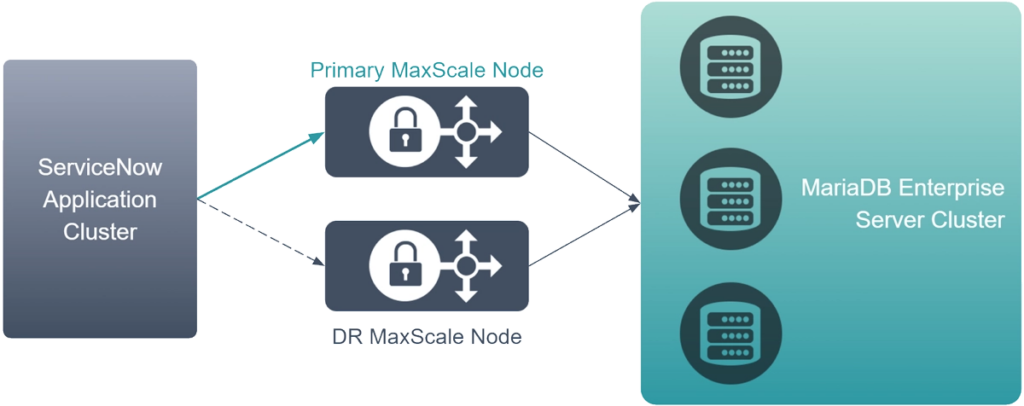
### Architecting for Disaster Recovery
Self-hosted ServiceNow supports high availability and disaster recovery out-of-box for the ServiceNow application layer, but what about for your database? While such functionality is not provided out-of-box with self-hosted ServiceNow, MariaDB’s experts have already worked with customers to validate, deploy, and maintain high availability optimized architectures, using [MariaDB MaxScale](https://staging-mdb.com/products/maxscale/), to address this need.
To achieve these goals, you will want to plan for at least two [MariaDB MaxScale](https://staging-mdb.com/products/maxscale/) nodes and at least three [MariaDB Enterprise Server](https://staging-mdb.com/products/enterprise/) backends.
### Deploying MariaDB Enterprise Server
Deploying MariaDB Enterprise Server for self-hosted ServiceNow works just like a regular MariaDB Enterprise Server deployment. Please follow [our deployment guide](https://staging-mdb.com/docs/server/deploy/topologies/primary-replica/enterprise-server-10-6/), selecting the `readwritesplit` router from the MaxScale configuration steps.
### Configuring MariaDB Enterprise Server for Self-Hosted ServiceNow
Once deployment is completed, replace `/etc/my.cnf.d/` with our [configuration files](https://staging-mdb.com/wp-content/uploads/2024/03/SelfHostedServiceNow_10-6_Config.zip) on each of the deployed MariaDB servers. Then, adjust the following as-needed:
| Variable | Consideration |
|---|---|
| `server_id` | Make sure each instance has a unique number here |
| `slave_parallel_threads` | Reference server has 48 physical cores- change this to match your database server’s physical core count |
| `max_connections` | Lower this to match the number of concurrent queries you expect your use-case to require |
| `innodb_buffer_pool_size` | Reference server has 1TB of RAM- change this to be 66% or less of your database server’s available RAM |
| `innodb_buffer_pool_chunk_size` | Set this to `innodb_buffer_pool_size / 64` |
| `innodb_log_file_size` | For particularly small deployments, you may need to lower this based on your storage capacity. Never set this below `4G-` upgrade storage capacity in that case |
| `innodb_io_capacity` | Fast, NVMe solid state storage is recommended for self-hosted ServiceNow database deployments. [You may need to lower this value if you are using slower storage](https://staging-mdb.com/kb/en/innodb-page-flushing/#configuring-the-innodb-io-capacity) |
Once the adjustments have been made, restart MariaDB Server to apply the changes.
### Already have your configuration set?
While most tuning for MariaDB databases powering self-hosted ServiceNow follows best-practice MariaDB Server tuning, there are some settings you will want to consider adding or adjusting in your configuration to match ServiceNow application expectations better:
| Variable | Recommended Setting |
|---|---|
| `character_set_server` | `utf8mb3` |
| `sql_mode` | `NO_ENGINE_SUBSTITUTION` |
| `optimizer_use_condition_selectivity` | `1` |
| `optimizer_switch` | `'rowid_filter=off'` |
| `optimizer_search_depth` | `11` |
| `eq_range_index_dive_limit` | `0` |
### Connecting Your MariaDB Cluster and Configuring MariaDB Databases for Disaster Recovery for Your Self-Hosted ServiceNow Deployment
Once everything is deployed, it is time to configure ServiceNow to connect to MariaDB MaxScale. Please [review our blog post on how to configure ServiceNow and MaxScale to facilitate failover and disaster recovery](https://staging-mdb.com/resources/blog/configuring-mariadb-databases-for-disaster-recovery-for-self-hosted-servicenow-deployments/) to improve the resilience of your self-hosted ServiceNow deployment’s database cluster.
### Next steps
- Need help or want to connect? MariaDB is here to help with [Remote DBA](https://staging-mdb.com/services/remote-dba/), [Expert Technical Support](https://staging-mdb.com/services/technical-support-services/), [Migration](https://staging-mdb.com/services/migration-practice/), [Training](https://staging-mdb.com/services/training/), [Consulting](https://staging-mdb.com/services/consulting/) and [more](https://staging-mdb.com/services/).
- Contribute, learn from, and connect with your MariaDB community on [Slack](https://r.mariadb.com/join-community-slack), [DBA Stack Exchange](https://dba.stackexchange.com/questions/tagged/mariadb), and the Community [Knowledge Base](https://staging-mdb.com/kb/en/).
- Learn more about [MariaDB Enterprise Server](https://staging-mdb.com/products/enterprise/) and [contact us for a subscription](https://staging-mdb.com/contact/).